
How To Search Voters and Edit Voter Data
In this section, we’ll go over how to search voter data in the Your Right Campaign Voter Outreach plugin as well as how to update a voter’s record with new or updated information as your campaign progresses.
Searching Voter Records
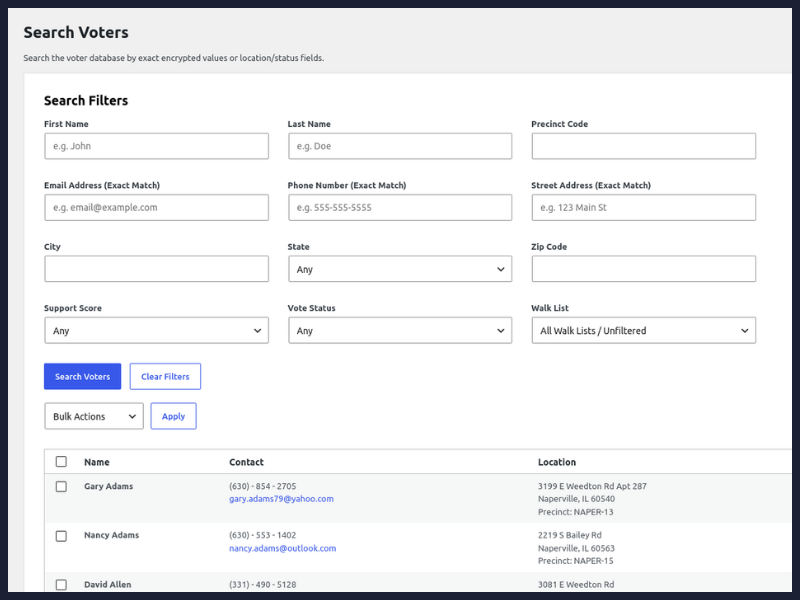
Once you’ve imported your voter data, you have access to a powerful search interface that lets you find voters by their name, email, phone number, address, vote status, support score and more. You can access the voter search by going to Your Right Campaign > Search Voters from your WordPress sidebar.
Use the form to find voters based on your desired criteria and click the Search Voters button to search. Note that some fields, like email address, phone number and street address must be an exact match, as these fields are encrypted.
Access Controls for Voter Search
Site administrators, as well as GOTV Administrators and GOTV Managers have full access to search voters and view and edit the profile of any voter found during a search. GOTV Volunteers have full access to search voters and view basic info, such as name, address and contact details, but can only view the full profile of and edit voters that appear on one of their walk lists. We’ll go over how to add a voter to a walk list in the next chapter of this manual.
Editing a Voter
To edit a voter, click on the View Profile button next to the voter’s record. If your account has sufficient privileges to edit the voter you will be presented with the voter’s record for you to edit.
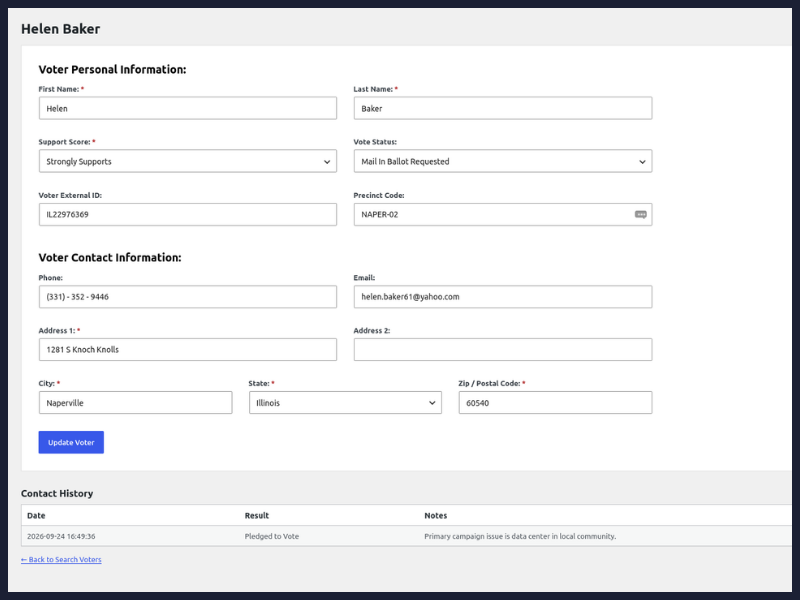
Once you have updated the voter’s information, click on the Update Voter button to save the changes to the voter’s information.
Deleting a Voter
When searching for voters, some user roles will have a Delete button next to each voter’s record. Click this button to permanently delete the voter’s record and all associated data, including logged voter contacts and custom notes. Clicking the button will prompt you with an Are You Sure? prompt that you must click to complete voter data deletion.
Ready to create your first voter walk list? View the walk list tutorial to learn how to create a walk list and add voters and volunteers to the walk list.